Vismuse
AI Video GeneratorCreate short AI videos from prompts, references, and briefs.AI Flyer GeneratorTurn events, offers, and listings into flyers.AI Brochure GeneratorStructure company, product, and service content into brochures.AI Album Cover GeneratorDesign album covers, mixtape art, and single artwork.AI Image MakerCreate any image from a prompt, link, or reference.Product Ad GeneratorGenerate product promo images and ad creatives.AI Room DesignUpload a room photo and redesign interiors with AI.Background RemoverRemove backgrounds for clean cutouts and product images.Business Card MakerCreate print-ready front and back business card designs.AI Logo GeneratorCreate logo concepts, brand marks, badges, and monograms.Tattoo GeneratorCreate tattoo concepts, stencil ideas, flash art, and sleeve layouts.AI Poster MakerCreate posters for events, product promotions, movies, lost-and-found notices, and more.Invitation MakerCreate birthday invitations, party invites, and event cards.AI Book Cover GeneratorCreate ebook, Kindle, and paperback cover concepts.AI Sticker GeneratorCreate stickers, reactions, and sticker sheets.AI Wallpaper GeneratorGenerate phone and desktop wallpapers.
AI VideoToolsTemplatesResourcesPricing
Flyer templatesChurch flyers

Flyer template collection

Church flyer templates for faster AI flyer drafts

Start from church flyers prompts that already account for purpose, audience, hierarchy, required details, format, and call to action.

Create your own flyerExplore the flyer maker

Choose a starting point for Church flyers

Open an example to customize its prompt. Replace the sample names, dates, venue, offer, and contact information with your own verified details.

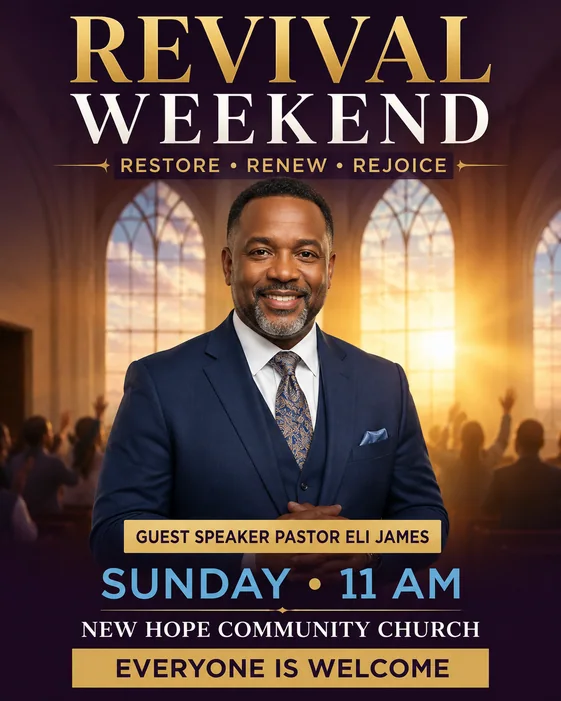
Church Revival example

Church Revival

A warm faith-event flyer with guest speaker space, service schedule, welcome message, and church details.

Customize this example →

Make the template your own

  1. Choose the message

    Promote a church event, service, ministry, fundraiser, or community announcement.

  2. Replace the sample copy

    Set your headline, required details, and one clear call to action. Add your approved images and choose the final format.

  3. Generate and refine

    Create a first draft in AI Flyer Generator, then ask for focused changes to wording, colors, imagery, or layout in the same chat.

  4. Review and download

    Proofread the whole image. Download as PNG or JPG, or export an eligible original as PDF at the generated aspect ratio.

These examples open as customizable AI prompts. For exact paper dimensions, bleed, and other print requirements, confirm the exported file with your printer.

More flyer resources

AI Flyer GeneratorParty Flyer GeneratorAll flyer templates25 AI flyer promptsEdit a flyer with AIHow to make a church flyerEvent flyers templatesBirthday flyers templatesClub flyers templatesReal estate flyers templatesParty flyers templates
Vismuse

Create and edit images and videos through conversation—no traditional editor required.

support@vismuse.com

Product

AI Image GeneratorAI Video GeneratorAI Animation GeneratorAlbum Cover MakerProduct Ad MakerAI Flyer Maker

Templates

All TemplatesFlyer TemplatesAlbum Covers

Resources

Help CenterDocsToolsPricing

Company

Contact supportAbout VismuseAcceptable UsePrivacyTermsRefund PolicyCookies
© 2026 Vismuse. All rights reserved.
EnglishDeutschFrançaisEspañolPortuguês (Brasil)日本語繁體中文