Vismuse
AI Video GeneratorCreate short AI videos from prompts, references, and briefs.AI Flyer GeneratorTurn events, offers, and listings into flyers.AI Brochure GeneratorStructure company, product, and service content into brochures.AI Album Cover GeneratorDesign album covers, mixtape art, and single artwork.AI Image MakerCreate any image from a prompt, link, or reference.Product Ad GeneratorGenerate product promo images and ad creatives.AI Room DesignUpload a room photo and redesign interiors with AI.Background RemoverRemove backgrounds for clean cutouts and product images.Business Card MakerCreate print-ready front and back business card designs.AI Logo GeneratorCreate logo concepts, brand marks, badges, and monograms.Tattoo GeneratorCreate tattoo concepts, stencil ideas, flash art, and sleeve layouts.AI Poster MakerCreate posters for events, product promotions, movies, lost-and-found notices, and more.Invitation MakerCreate birthday invitations, party invites, and event cards.AI Book Cover GeneratorCreate ebook, Kindle, and paperback cover concepts.AI Sticker GeneratorCreate stickers, reactions, and sticker sheets.AI Wallpaper GeneratorGenerate phone and desktop wallpapers.
AI VideoToolsTemplatesResourcesPricing
DocsBackground Remover Docs

Background editing

Background Remover documentation

Use Background Remover when you need to isolate the main subject, clean up a busy source photo, create a transparent-style cutout, or prepare a white background product image.
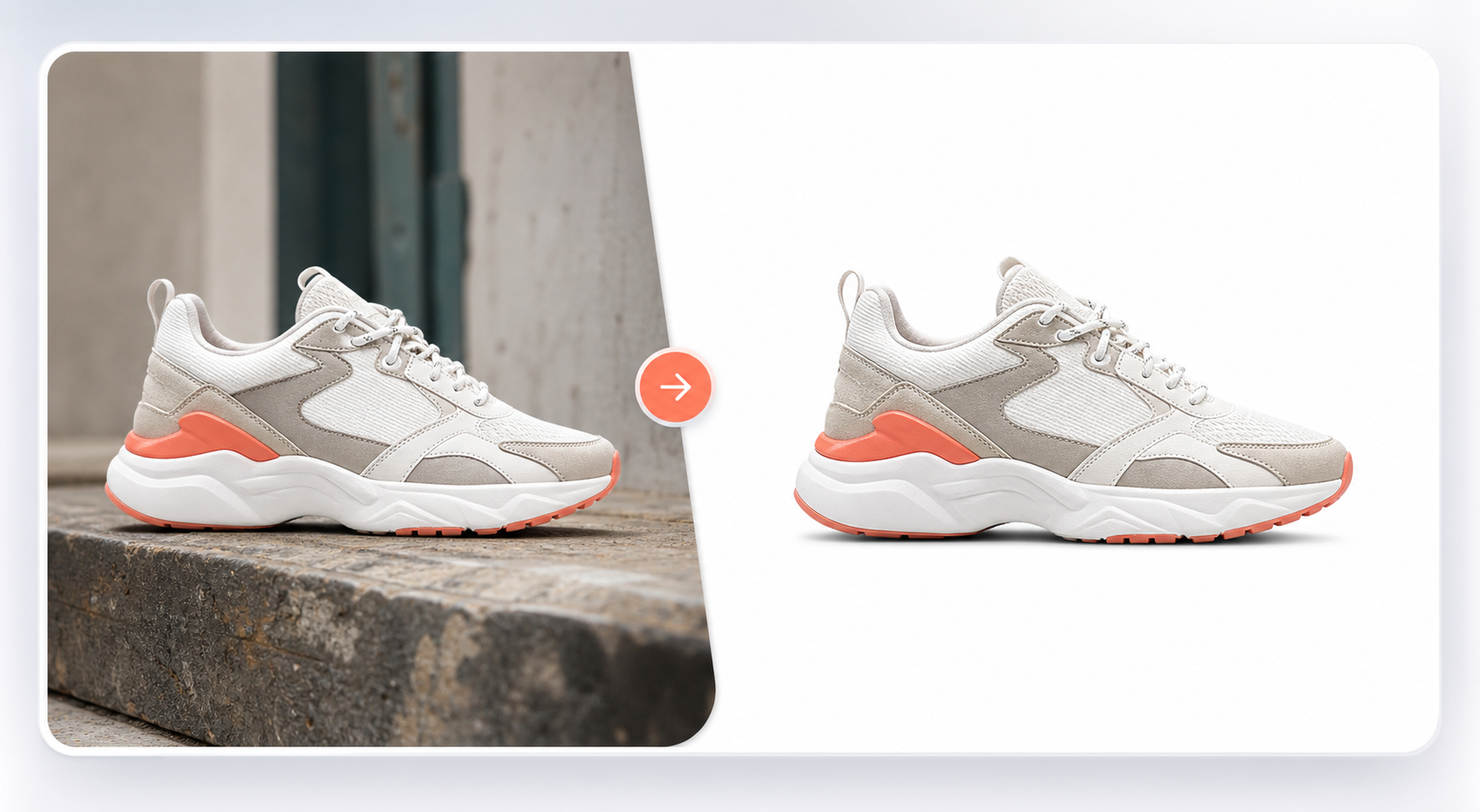
Product cutout prepared with Background Remover
Open Background Remover

When to use it

Use this workflow for product photos, portraits, logos, object photos, profile images, and ecommerce pictures that need a cleaner background.

It is useful as a first cleanup step before creating product ads, catalog images, marketplace visuals, or a new generated background around the same subject.

Supported inputs

Start with an uploaded image and optionally describe what you want after removal. Mention transparent background, white background, color background, or a new product scene when that final output matters.

  • Product photo or object image
  • Portrait, logo, or graphic
  • Transparent or white background preference
  • Optional follow-up background direction

What Vismuse generates

Vismuse creates a cleaned image direction that keeps the main subject sharp and lets you continue editing, change background color, create a product scene, or download the result.

  • Clean cutouts
  • Transparent-style results
  • White background product images
  • Editable follow-up background directions

Workflow

  1. Upload the source image
  2. Remove the background
  3. Choose transparent, white, color, or generated background
  4. Download or keep refining

Tips

  • Use clear source photos where the subject edge is visible.
  • Say if the output needs a white marketplace background or a transparent-style result.
  • After removal, use a follow-up prompt to create a new scene around the same subject.

Related resources

  • Remove an image background — Open the upload-first workflow for transparent backgrounds, white backgrounds, and clean product cutouts.
  • Create product ad images — Continue from a cleaned product photo into campaign scenes, ecommerce images, and ad creatives.

Explore related tools

  • AI Image Maker
  • Product Ad Generator
  • Template Library
Vismuse

Create and edit images and videos through conversation—no traditional editor required.

support@vismuse.com

Product

AI Image GeneratorAI Video GeneratorAI Animation GeneratorAlbum Cover MakerProduct Ad MakerAI Flyer Maker

Templates

All TemplatesFlyer TemplatesAlbum Covers

Resources

Help CenterDocsToolsPricing

Company

Contact supportAbout VismuseAcceptable UsePrivacyTermsRefund PolicyCookies
© 2026 Vismuse. All rights reserved.
EnglishDeutschFrançaisEspañolPortuguês (Brasil)日本語繁體中文